
Friday, January 16, 2015


Thursday, January 15, 2015
Padlet

Used Padlet to create an interactive wall for the kids to post their reindeer schema for our informational writing pieces.
Friday, January 9, 2015
Google Draw Friday!!
Happy Friday!!!
Here is a google draw creation to scaffold kids into problem solving and using a friendly 10.
Snowball decomposing

Thursday, January 8, 2015
Class Charts Part Two
So we started today and the kids love it. Parents were sent home their codes and they will be able to check on their child's behavior all day. The kids received their codes and they have been checking in too.
Gadgets:
So you can change the face icons and let the kids choose their own.

You can add positive behaviors and negative behaviors to the short list they provide. These are the extras that you can add:


Gadgets:
So you can change the face icons and let the kids choose their own.
You can add positive behaviors and negative behaviors to the short list they provide. These are the extras that you can add:
Here is what the daily report looks like. They also have weekly and monthly.
You can also add comments or use a yes or no format.
Wednesday, January 7, 2015
Class Charts App

During the day students can earn award points.

Teachers can also remove points and choose the behavior that students need to improve.

Monday, January 5, 2015
Phases of the Moon
We have been discussing the phases of the moon so I created an assessment in Google Draw.
Here it is...Phases of the moon

Here it is...Phases of the moon

Wednesday, November 19, 2014
Hint Cards
I use Hint cards in my classroom. Hint cards allow kids to be successful in lessons. Before kids ask you for help they need to get a hint card and use it to push their thinking. So I was asked the other day about hint cards in kindergarten. They can’t read yet, so how do they read the hint card?? I thought about it and decided to try creating Screencastify hint cards. Here they are:
Friday, November 14, 2014
Chromebook Stars!!
So my first graders are chromebook stars!! They are self sufficient with taking them home every night and returning them fully charged. They use google classroom independently and screen castify is their favorite. They help one another with chromebook questions and collaborate on assignments. Yesterday a student asked me if he could share the differences between a woolly mammoth and a woolly rhinoceros. So we found pictures of each on the chromebook and displayed them while he talked about each one. Then I went into google draw and showed the students how to create a venn diagram. We inserted the photos and I scripted facts that were shared. The student wanted to continue it at home so I set up a google classroom just for him and added his venn diagram so he could continue his research at home. LOVE IT!! Here is what he has so far:

Friday, November 7, 2014

Thursday, November 6, 2014
Google Cast
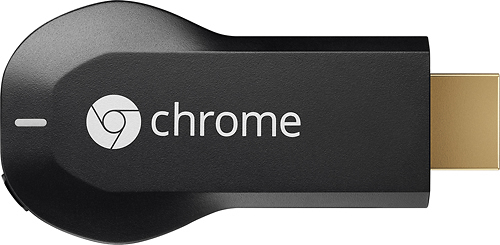
A big thank you to Audra McPhillips for coming to our classroom today!! She helped me set up Google Cast. so my students could cast their screens onto the board. They each built a word with letter tiles Fundations on their chromebook and then took turns casting their screen and showing everyone what their word was. They loved it!! This is what the chromecast device looks like. You can purchase one at Best Buy for $32.00.

Friday, October 31, 2014
Virtual Manipulatives
I love this site: virtual manipulatives! The possibilities are endless. You type in your grade level and it supplies you with a menu of manipulatives and backgrounds. They have game boards, work mats, storyboards and a wide range of manipulatives. Here are a few screen shots of what I found so far.:

Bears on a shelf (Making 10 activity)
Bears on a shelf (Making 10 activity)
 |
| Movable hands |

Subscribe to:
Posts (Atom)